Enable Copy & Paste
NoMachine supports copying and pasting text between your local computer and remote Mac Mini server. Follow these steps to ensure everything is configured correctly.
Configure Keyboard Shortcuts
Section titled “Configure Keyboard Shortcuts”-
Step 1:
Section titled “Step 1:”Connect to your Mac Mini using NoMachine
-
Open the NoMachine Menu:
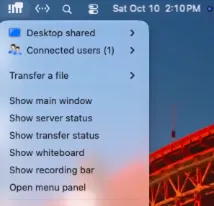
Section titled “Open the NoMachine Menu:”Navigate to the top right section of your Mac Mini server and click the icon in the top left of this image below. Then select the “Open Menu Panel” option. Then select the “Input” settings.
-
Enable Settings:
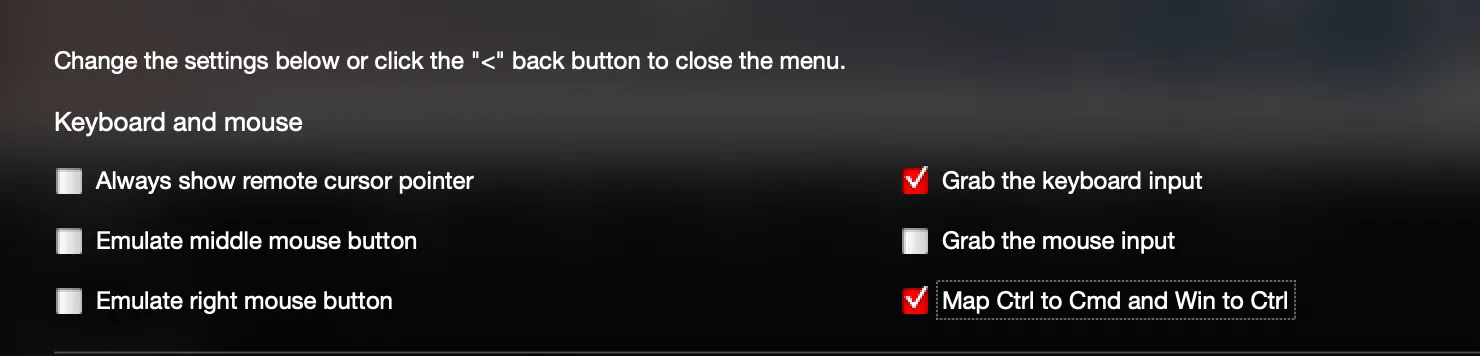
Section titled “Enable Settings:”Enable the 2 following settings in the menu.
- ✅ Map Ctrl to Cmd and Win to Ctrl
- ✅ Grab the keyboard input (recommended)